
The CargoX race in your menu bar
CargoX Race puts today's documents, the change against a past day and the CXO price at the top of your screen. Click it to watch today race any days you pick, live, like the tracker's race mode.
Version 1.0 · ZIP, 0.5 MB · macOS 14 Sonoma or later · Apple silicon and Intel
Want the whole site as an app on any device? Get the full app →
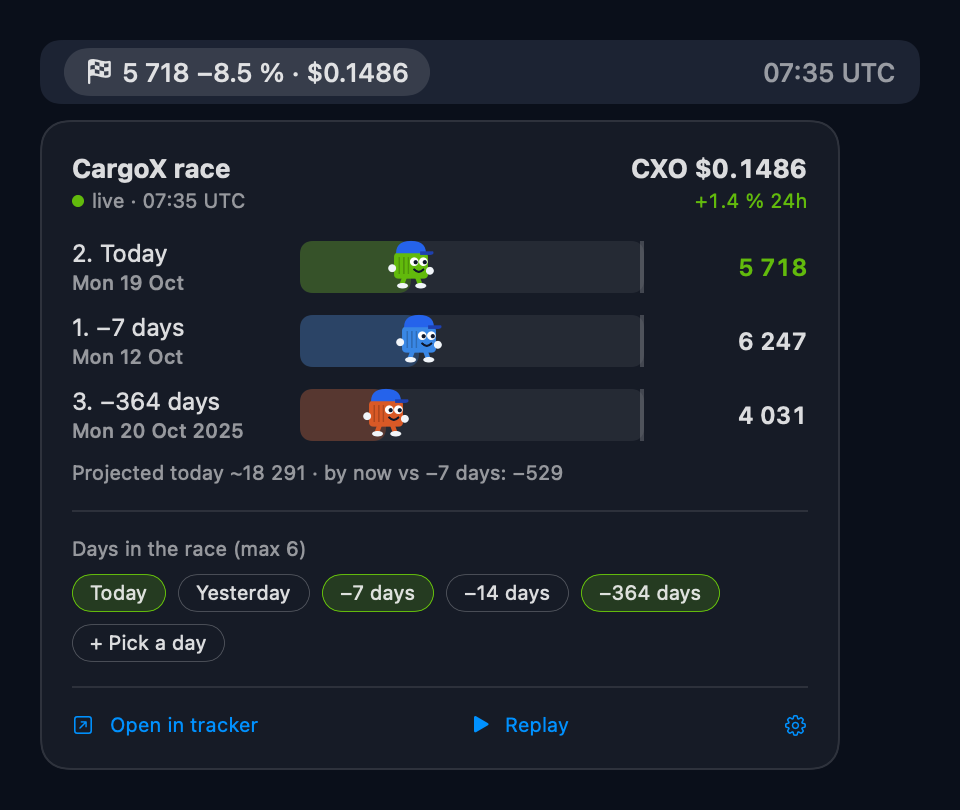
Glance at the menu bar, click for the race
Today in the menu bar
Documents so far today, how far ahead or behind you are against the first day in your race at the same hour, and the CXO price. Turn the change or the price off in settings.
A live race
Up to six days race hour by hour (UTC). Today updates every 15 seconds and its runner takes a few steps whenever new documents arrive. Replay runs the day from midnight.
Your days
Yesterday, a week ago, two weeks ago, a year ago, or any date from the calendar. Relative days roll over at UTC midnight. Your choice is remembered.
End-of-day projection
The tracker's damped pace projection for today, plus the gap against your reference day in documents.
CXO price
The current CXO price with its 24-hour change, the same figure as the tracker.
One click to the web
Open in tracker opens the same race on /tracker, with all the charts behind it.
Install in a minute
-
Download and unzip
Download CargoX-Race.zip. Safari unzips it for you. In other browsers, double-click the ZIP in Downloads. You get CargoX Race.app.
-
Move it to Applications
Drag CargoX Race into the Applications folder in Finder. The app has to stay in one place for "Launch at login" to work.
-
Open it and allow it once
Double-click the app. The app is free and not distributed through the App Store, so the first time macOS says it could not verify it. Allow it once:
- Click Done in the warning.
- Open System Settings → Privacy & Security and scroll down to Security.
- Next to "CargoX Race" was blocked, click Open Anyway, confirm with your password, then click Open.
Prefer Terminal? This does the same:
xattr -dr com.apple.quarantine "/Applications/CargoX Race.app" -
Find it in the menu bar
A 🏁 with today's count appears at the top right of the screen, next to Wi-Fi and the clock. The app has no Dock icon or window. Click the item to open the race.
-
Make it yours
Tick the days you want in Days in the race. The gear icon turns the change and price in the menu bar on or off, sets Launch at login and has Quit.
Good to know
Do I need an account?
No. The app reads the same public data as the tracker from cargoxrelayer.com. It sends nothing about you, has no wallet access and stores only your chosen days on your Mac.
Why the security warning?
Apple shows it for any app not distributed through its paid developer program. You allow it once (step 3), and it opens normally after that.
I can't see it in the menu bar
On a crowded menu bar, macOS hides items behind the notch. Quit an app or two, or hold ⌘ and drag menu bar icons to make room. Running the app again doesn't open a second copy.
How do I update or remove it?
Choose Quit from the gear menu, then delete the app from Applications. To update, download the new ZIP and replace the old app. Your days are kept.
What does "≈" next to a number mean?
That day's hourly breakdown wasn't stored, so its total is spread over a typical day, the same as on the tracker.
Widget or full app?
CargoX Race keeps today's number in the menu bar all the time and opens the race in one click. The full app is the whole site in its own window, on Mac, Windows, Android and iPhone. You can use both.